Archive for January, 2008

Sublime Text Editor Review

Monday, January 28th, 2008

I’ve just bought a copy of sublime text, a very pretty text editor for Windows. I’m a bit of text editor geek, but I think it’s justified, with the amount of time I spend typing. Between coding and writing fiction, I spend hours and hours a day typing, so a good text editor is as important as a comfy chair, a good monitor, or a cup of tea. It’s just not civilised without.

sublime text screenshot

If you spend much time writing text, you may want to have a look. I’m using mine for both programming code, and for fiction.

These things make it well worth it, in my opinion;

  1. It’s gorgeous. Text Editing shouldn’t feel this good, says the website, and it’s absolutely right. The colour schemes are lovely, especially Chocolate Box, which is shown on the screenshot. If simple text editors like Notepad feel like using a bic biro, and emacs and vi feel like using a technical pencil, sublime text feels like using a fountain pen.

  2. It’s functional. As a programmer, you expect the ability to do serious things to your text. Sublime comes bundled with syntax highlighting for many languages, a python plugin system, a build system, it’s own macro language, regex searching, snippets, sorting… there’s lots here. The ability to write python programs means that it’s going to be possible to write, well, absolutely anything you need. And you don’t have to do it in emacs lisp

  3. The support is amazing. It’s written by Jon Skinner, an Australian who left his job at Google to write the editor. I wrote him an email yesterday suggesting a feature. Twelve hours later, he’s written the code and put it into the next beta. Twelve hours. And the reply email was chock-full of details he didn’t need to include, and an apology about the tardyness of the reply.

  4. Full-screen mode; It has a full-screen mode that lets you blow the window up to occupy every available pixel, which makes it great for writing without distraction. If you’ve looked at rudimentary full-screen editors like WriteRoom, you’ll know the idea; replace your cluttered desktop with a single text entry window. Sublime Text does this, but still has the advanced functionality of a heavyweight text editor.

  5. It’s only just begun. The current version is 1.01, and already it’s stuffed with goodies.

Anyway. Enough. Go get it.

Update: Here’s a copy of my enhanced Markdown package, which I use to write prose: Download link — unzip it to your Packages folder. In the file Markdown - Enhanced.sublime-options, the first line describes the extensions which will open and use this format. Change it to change the file types (.txt, .fiction, etc) which will use this package.
Post to Twitter Tweet This Post

LaTeX build server in Ruby

Wednesday, January 23rd, 2008

So — I’ve been writing functional specs at work in LaTeX, a system for writing documents in a code-y markup language. Seems to fit nicely with being in a programmer headspace. The only thing, really, is that you have to compile your document. A bit of a ballache. But — I’ve also been learning Ruby, and found it easy to knock up a program that sits patiently waiting for you to save your .tex source file, then recompiles it in the background.

So, if you want to use it, here’s how it works;

  1. modify the script below to point to your own latex distribution and source file.
  2. run the script to start the ‘build server’
  3. open your .tex file, make a change, and save it.
  4. watch your ruby program spring to life and compile to a .dvi file
  5. Open that .dvi file in a viewer; I’m using yap.
  6. make more changes to your .tex file. Every time you save it, the .dvi file will be updated, and yap will reload it, giving you instant feedback on your changes. It’s just like a wysiwyg editor! almost!

enjoy;

#
# LaTeX build server!
#
# Steve Cooper
#

file = "c:\\documents and settings\\steve\\Desktop\\bulk-activation-specification.tex"

cmd = "\"C:\\Program Files (x86)\\MiKTeX 2.7\\miktex\\bin\\latex.exe\" --interaction=nonstopmode \"" + file + "\""
print "Compilation command:\n  #{ cmd }\n\n"

class String
  def mtime
    File.new(self).mtime
  end
end

lastmtime = file.mtime

while true
  currentTime = file.mtime
  if (currentTime > lastmtime) then
    print "file modified at " + currentTime.to_s
    lastmtime = currentTime
    print "Compiling " + file + "\n"
    system cmd 
  end
  print ". "
  sleep 1
end

Post to Twitter Tweet This Post

lisp, the beautiful hydra

Monday, January 21st, 2008

I’m currently learning the programming language, Lisp. If you’re not a programmer, you may wish to simply ignore this post…

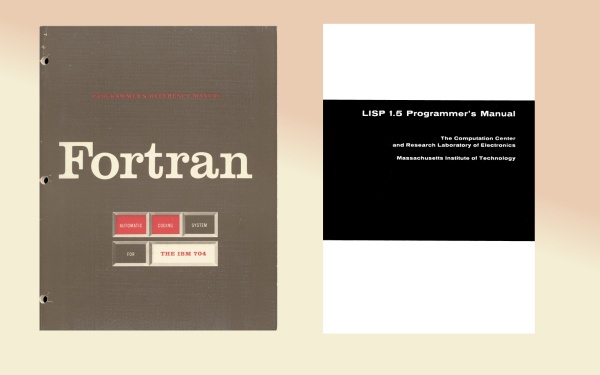
Lisp doesn’t have the mindshare it deserves. At fifty, it is the second-oldest programming language in the world, after Fortran. I’m starting to see the whole history of programming as a struggle between the elder brother, Fortran, and the younger sister, Lisp.

Fortran Vs Lisp

Programming is, at it’s core, an attempt to write down the solution to a problem so precisely that a mechanical device can perform the solution. We start with our own ideas, then use the program and a compiler to give us machine instructions;

ideas -> program -> machine instructions

There are two approaches; one is to find better ways to describe machine instructions, which is what FORTRAN does. The other is to find better ways to describe ideas, which is what Lisp does. These two languages established for us an axis; Almost every programming language thereafter fits somewhere in between these two giants.

So far, my impression is that lisp is an excellent language, let down by it’s awful libraries and tools; compared to Ruby, Python, Java, or C#, it just doesn’t have the libraries, and getting extant libraries installed is a dog. Worse, there is no canonical implementation, which means that your code may or may not work on someone else’s lisp; even worse news for libraries. It’s a pity, because the language itself seems beautiful and powerful. Meh.

Post to Twitter Tweet This Post

Object-oriented vs class-oriented programming

Sunday, January 13th, 2008

In his well-reasoned blog post, chuck hoffman argues that what are normally called object-oriented programming languages should probably more rightly be called class-oriented languages. The distinction hopefully becomes clear when you consider this example.

You are modelling people, and you want to create a person type. You should be able to strike up a conversation, so we want a ‘greet’ method for each. Our people (Alice, Bert, Charlie, and Dennis) all respond differently;

  • Alice responds to a greeting with “Hi!”, or a surly “what!?” if she hasn’t had her morning coffee.
  • Bert responds with either “don’t bother me, I’m walking Spot” or “what can I do for you?”, depending on whether he is walking his dog.
  • Charlie responds with either “good morning”, “good afternoon”, or “good evening”, depending on the time of day.
  • Dennis responds with “Hello, world!”

Now, in C#, that’s really tricky. Each person uses a different function to answer your greeting. But in C#, the Person class can only have one implementation. You could munge them all together;

class Person
{
  string Greet()
  {
    if (isBert && isWalkingSpot) {return "don't bother me, I'm walking Spot"; }
    else if (isAlice && !hasHadCoffee) { return "what!?"; }
    ... etc
  }
}

But that is monstrous. You could create subclasses;

class Dennis: Person
{
  public override string Greet() { return "Hello, World!"; } 
}

But this isn’t a class of thing; Dennis is singular. There’s not a whole class of Dennises, just a single solitary one.

What you really want to be able to do is something like this; (excuse the made-up syntax)

Person Alice = new Person();
Alice.HasCoffee = false;
Alice.Greet = { (HasCoffee ? "Hi!" : "what!?") }

Person Dennis = new Person();
Dennis.Greet = { "Hello, World" };

That’s what an object-oriented, rather than a class-oriented, version of c# might look like.

Post to Twitter Tweet This Post

Power-assisted robot suits

Thursday, January 10th, 2008

Right. The future is officially now;

As Japan’s dwindling ranks of farmers grow old, scientists are developing new ways to lighten their physical load and keep them productive. At the Tokyo University of Agriculture and Technology, a research team led by professor Shigeki Toyama has developed a wearable power-assist robot suit designed to boost the strength of farmers working in the field.

from pink tentatle

Post to Twitter Tweet This Post

First Fiction Sale

Monday, January 7th, 2008

I’ve made my first fiction sale! Hub Magazine have publishing my 600-word story, Brainfish [pdf)

Post to Twitter Tweet This Post

C# Coding; Missing Functions on IEnumerable

Thursday, January 3rd, 2008

Me old mucker Spencer pointed out today that C# 3’s newly-refurbished IEnumerable<T> class lacks some basic features. Specifically, it lacks equivalents for the classic Map, Filter, and Reduce functions seen in functional languages. The first two are familiar as List<T>.ConvertAll, and List<T>.FindAll. The third isn’t so familiar, but is still very useful. I’ve also thrown in an implementation of ForEach for free.

Ben Hall points out that it’s possible to extend the class, but I wanted to get a full, commented implementation of the three functions. Feel free to use this code in your own work.

So, here they are;

IEnumerableExtras

public static class IEnumerableExtras
{
    /// <summary>
    /// Do 'action' to every item in the list.
    /// </summary>
    /// <typeparam name="T">The source type</typeparam>
    /// <param name="list">the IEnum</param>
    /// <param name="action">the action to perform.</param>
    public static void ForEach<T>
        (this IEnumerable<T> list, Action<T> action)
    {
        foreach (T item in list) { action(item); }
    }

    /// <summary>
    /// Convert every item in the list using the converter
    /// function
    /// </summary>
    /// <typeparam name="T">The source type</typeparam>
    /// <typeparam name="U">The destination type</typeparam>
    /// <param name="list">the list to convert</param>
    /// <param name="converter">a function to convert 
    /// one item to another.</param>
    /// <returns>all items in the list converted by 
    /// the converter function.</returns>
    public static IEnumerable<U> Map<T, U>
        (this IEnumerable<T> list, Converter<T, U> converter)
    {
        foreach (T item in list) 
        {
          yield return converter(item); 
        }
    }

    /// <summary>
    /// Returns a new enumerator containing only those 
    /// elements which return true from 'condition'.
    /// </summary>
    /// <typeparam name="T">The source type</typeparam>
    /// <param name="list">the list to filter</param>
    /// <param name="condition">the 'keep in' condition</param>
    /// <returns>the items for which condition(item) 
    /// is true</returns>
    public static IEnumerable<T> Filter<T>
        (this IEnumerable<T> list, Predicate<T> condition)
    {
        foreach (T item in list) 
        {
          if (condition(item))
          {
            yield return item; 
          }
        }
    }

    /// <summary>
    /// Reduces a list of items to a single item; can be 
    /// used to, say, sum a list of integers, or 
    /// concatenate a number of strings, or find the 
    /// maximum value in a collection.
    /// </summary>
    /// <typeparam name="T"></typeparam>
    /// <param name="list"></param>
    /// <param name="reducer"></param>
    /// <returns></returns>
    public static T Reduce<T>
        (this IEnumerable<T> list, Func<T, T, T> reducer)
    {
        IEnumerator<T> enumerator = list.GetEnumerator();
        if (enumerator.MoveNext())
        {
            // we have some items; start combining them together.
            T aggregator = enumerator.Current;
            while (enumerator.MoveNext())
            {
                aggregator = reducer(aggregator, 
                    enumerator.Current);
            }
            return aggregator;
        }
        else
        {
            // there was nothing in the list; return default.
            return default(T);
        }          
    }
}

And here’s an example program;

static void Main(string[] args)
{
  IEnumerable<double?> maybeDoubles = 
      new List<double?> {1, 2, null, 3, 4, null, null, null};

  // remove all the empty values: <double?>[1,2,3,4]
  IEnumerable<double?> noNulls = maybeDoubles.Filter(x => x.HasValue);

  // convert Nullable to non-nullable: ><double>[1,2,3,4]
  IEnumerable<double> notNullable = noNulls.Map(x => x.Value);

  // convert to strings so we can display them. <string>["1", "2", "3", "4"]
  IEnumerable<string> stringVersions = notNullable.Map(x=>x.ToString());

  // join the strings together with commas "1, 2, 3, 4"
  string displayString = stringVersions.Reduce( (s1, s2) => s1 + ", " + s2); 

  // show us the result; 
  Console.WriteLine(displayString);
  Console.ReadLine();
}

So there you go. Enjoy.

Post to Twitter Tweet This Post

Seasick Steve; top mississippi blues at Leeds Met

Thursday, January 3rd, 2008

We stayed in over new year and watched Jools Holland’s Hootenanny. Possibly the best act on it was a bluesman called Seasick Steve (home) (w’pedia). He is the bastard hillbilly child of Tom Waits and John Lee Hooker.

Anyway, he’s playing Leeds Met on the 31st and we’ll be going. Anyone fancies coming along, I think it’ll be a fine night of good music. Doors at seven, we’ll be getting a train around six, I suppose. Call me.

Post to Twitter Tweet This Post