Archive for the ‘programming’ Category

Creative writing on the iPhone followup - iUI

Wednesday, July 22nd, 2009

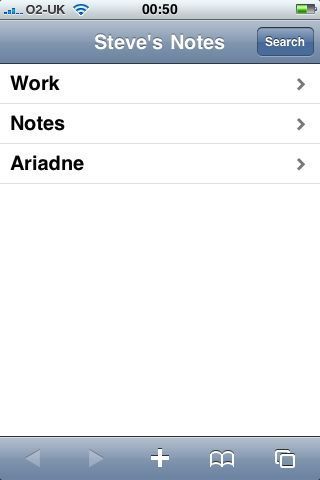
I just wrote about the problems of note taking on the iPhone and PC. It may not be as difficult as I previously thought. There is a great project called iUI on google code which makes it easy to roll your own iPhone-flavoured website. I got this very basic screen up and running within minutes. I may look into creating an Ajax app using iUI, jQuery, markdown, and WMD

Post to Twitter Tweet This Post

Python-style string formatting for C#

Saturday, January 24th, 2009

Jon Skeet recently asked in one of his posts:

it would be really nice to be able to write:

throw new IOException("Expected to read {0} bytes but only {1} were available", requiredSize, bytesRead);

Which would do the same as

throw new IOException(String.Format(
    "Expected to read {0} bytes but only {1} were available", 
    requiredSize, bytesRead)); 

And it got me wondering about the String.Format method, and how much uglier it makes C# code to read than, say, the equivalent python code. Alongside each other;

// C#
string message = String.Format(
    "Expected to read {0} bytes but only {1} were available", 
    requiredSize, bytesRead);

// python
message = "Expected to read %s bytes but only %s were available" % (requiredSize, bytesRead)

I think I’d solve the problem, not by creating a new constructor for IOException, but by making String.Format part of the C# syntax. It works very nicely for python, and it’s such a common thing to do that I tink it would warrant a change to the language. Given how cumbersome String.Format is, it’s often shorter and clearer to use simple string concatenation. This makes things rather inconsistent.

Here’s what I came up with. It’s a ‘first draft’, and more for interest’s sake than as something I’d put into production.

Instead of passing an object array in as the values, I’m reading from the properties of an object. So you can do it with objects or tuples;

var person = new Person() 
{ 
  firstname="Steve", 
  secondname="Cooper" 
};

Then you can inject the tuple into a format string like this;

string message = "{firstname} {surname} says injecting properties is fun!".ㄍ(person)
// message == "Steve Cooper says injecting properties is fun!"

So you’ll see this weird thing on the end of the format string that looks like a double-chevron. This is supposed to look like a double arrow, pushing values into the format string. In fact, it’s the Bopomopho letter ‘G’ and therefore a perfectly normal C# method name.

Here’s the code for the double-chevron method. I say again, this is just a proof of concept, not production code. Use at your own peril. (In fact, don’t use. Write your own. It’ll be more solid.)

public static class StringFormatting
{
  public static string ㄍ(this string format, object o)
  {
    var rx = new System.Text.RegularExpressions.Regex(@"\{(?<name>\w+)\}");
    var match = rx.Match(format);
    while (match.Success)
    {
      string name = match.Groups["name"].Value;
      format = format
      .Replace("{", "{{")
      .Replace("}", "}}")
      ;
      format = format.Replace("{{" + name + "}}", "{0}");

      object prop = o.GetType().GetProperty(name).GetValue(o, null);
      format = string.Format(format, prop);
      match = rx.Match(format);

    }
    return format;
  }
}

Post to Twitter Tweet This Post

SonicFileFinder for Visual Studio

Tuesday, December 16th, 2008

For those of you who use Visual Studio all day, can I suggest that you install SonicFileFinder?

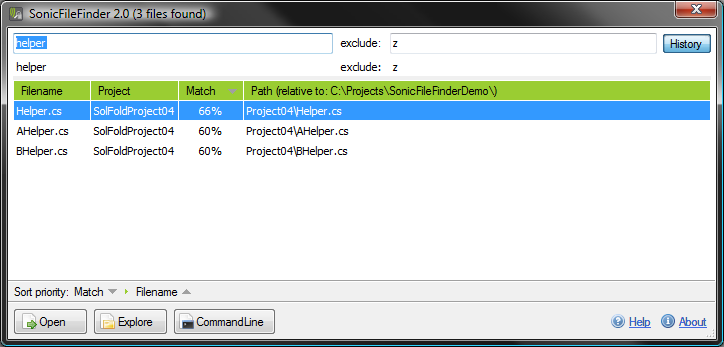
This lovely little addin by Jens Schaller gives you a way to find files in your current solution with a few keypresses. Invoke it, and you see a dialogue like this;

Sonic File Finder

Type in a fragment of a filename, and you’ll get a filtered list of files matching that fragment. Choose a file, hit ‘return’, and the file opens in the code editor.

Basically, if you know the name of your file, you no longer need to use the Solution Explorer. As codebases get bigger and bigger, this addin gets more valuable as the Solution Explorer gets worse.

Highly recommended, plus it now works with F#, C#, and VB.NET projects.

Post to Twitter Tweet This Post

A lisp macro virgin tells all

Saturday, April 12th, 2008

I finished my first lisp macro, and I want to tell the world.

I’ll talk about what a lisp macro is, and what makes it unique in the world of programming, how it’s a technique only possible in lisp. I’ll then take you through an example.

So firstly, what’s a lisp macro, and why would you want to write one?

So, you may have seen lisp programs before, and you’ll recognise them instantly — Larry Wall, the inventor of Perl, said they had all the aesthetic appeal of a bowl of porridge mixed with toenail clippings;

(defun accumulate (combiner lst initial)
  (let ((accum initial))
    (dolist (i lst)
      (setf accum (funcall combiner accum i)))
    accum))

He has a point. They are butt-ugly. But hell, the best he came up with is Perl, so he can $_@++ right off. (I’m pretty sure that’s valid Perl, too ;) )

It’s ugly, in an aesthetic way, but it’s amazingly practical. It’s got an engineering beauty to it. If you look at that snippet above, you’ll notice that the whole program is made out of exactly three types of symbols;

  • open parenthesis: (
  • close parenthesis: )
  • symbols, like defun, accum and setf

All simple lisp programs are like this. Just brackets to group stuff together, and stuff that needs grouping. Compare that with C#, where you might find;

  • parenthesis for;
    • function calls; print("hello")
    • special forms; using(OdbcConnection con = ...)
  • semi-colon to end statements; int x = 1;
  • curly brackets for;
    • code blocks; { /* code block */ }
    • array initialisers; string[] words = { “hello”, “world” };
  • square brackets for array indexing; x[3] = 4;

and the list goes on. I gave up because there are too many to list.

So lisp has this seriously small syntactic footprint. You can have a thing, or a group of things in brackets. It’s simple. It’s so simple that you can start doing crazy stuff in lisp that you just can’t do otherwise. That crazy stuff goes by the name of macros.

I can write a program that takes a chunk of lisp (remember, just a thing or a list of things), cuts it up, and reassembles it. That creates new lisp code.

So imagine you do a lot of work on three-dimensional arrays. You find yourself, over and over, writing nested loops that say;

for x in range(100):
    for y in range(100):
        for z in range(100):
            # do something to matrix[x,y,z]

And frankly, you’re bored of typing it over and over. What you really want to do is something like;

for {x 100, y 100, z 100}:
    # do something to matrix[x,y,z]

You want a brand new bit of syntax for multiple-value looping. Can you add it to python? Nope. C? Nope. Java? Nope.

But now look at the lisp version;

I could, theoretically, write this

(domanytimes (x 100 y 100 z 100) 
    body)

and, because it’s just a list of stuff, I can chop and change that into this new bit of lisp;

(dotimes (x 100)
    (dotimes (y 100)
        (dotimes (z 100)
            body)))

I’ll show you how in a second, but notice what’s possible — I can write my own looping construct (domanytimes) and lisp will rewrite it into many simpler looping construct (the built-in dotimes).

Is that particularly special? Well, yeah. I’ve written new syntax. I’ve defined a new way of looping that is no different from the standard loops. I’ve basically added something new to the language. Lisp is now better at dealing with multi-dimensional loops. Try adding a new loop to ruby, or javascript. Make python understand

for x in range(100), y in range(100), z in range(100):
      # body here 

and you’ll find you can’t.

So I’ve made my version of lisp a bit better at handling loops. If I were writing database code, I could make lisp better at writing SQL statements or data access layers. C# recently got built-in DAL logic with LINQ, and it’s great, but only the C# team can write it. Whereas a lisper could write this sort of code;

(sql-select (ID NAME) from PROJECT where (DUEDATE > TODAY))

and it’s do basically the same thing as LINQ.

So that’s the why’s and wherefores. Here’s the how of the domanytimes macro.

domanytimes takes two parts; the loop variables (x 100 y 100 z 100) and whatever body you want to execute. We’re going to write a program that skims two elements from the front of the loop variables (say, x and 100) and uses them to write a built-in dotimes loop; so a program which converts

(domanytimes (x 100 y 100) body)

into

(dotimes (x 100) 
   (domanytimes (y 100) body))

and then again to give you

(dotimes (x 100)
    (dotimes (y 100)
        body))

Here’s the domanytimes macro, in all it’s eye-bleeding horror;

(defmacro domanytimes (loop-list &body body)
  "allows you to write (domanytimes (x 10 y 10) ...) 
  instead of (dotimes (x 10) (dotimes (y 10)) body ))"
  (if (eq (length loop-list) 0)
      ;; we have our form to execute
      `(progn ,@body)
      ;; we have more loops to arrange
      (let ((fst (car loop-list))
        (snd (cadr loop-list))
        (rst (cddr loop-list)))
    `(dotimes (,fst ,snd)
      (domanytimes ,rst ,@body)))))

There. Wasn’t that fun? ;)

It looks nasty, I know. All lisp looks nasty. But it’s actually created something new in the language. As far as I understand it, lisp has survived for fifty years basically because the macro system lets you write macros which can add any new kind of syntax you like. You can write knock up a set of macros to implement OO, and suddenly lisp is OO. You can know up macros for manipulating lazy lists, and suddenly lisp has a lazy evaluation. You can knock up data access layer macros, and it’s got a version of LINQ. There seems to be nothing you can’t hack lisp into being.

And if you want to know how the hell that works, I’d recommend Practical Common Lisp, which is online and free.

Post to Twitter Tweet This Post

Modifying large codebases in dynamic and static languages

Saturday, April 5th, 2008

I’ve been wondering recently about dynamic languages, and static languages, and the relative benefits.

I’m struggling with this question because I write C#3 by day, and am learning python in the evenings. I’m only writing small python scripts at the moment and I’d like to write larger pieces, but I’m concerned about how easy it’ll be to make certain types of change.

For example. You’ve got 100,000 lines of code. You also have a logging function that’s looks like this;

void Log(string message)

And it’s called about 200 times in your code. You decide you need a severity; so you change the signature to

void Log(string message, LoggingSeverity severity) { .. }

Now, how long does it take to find all the calls to the Log() function that need to be updated? Under C#, about ten seconds. Once every call has been fixed, the code is almost certain to work correctly.

Consider, on the other hand, the python function

def log(message):
    ...

What happens if you change the signature to

def log(message, severity):
    ...

There is no way to tell where the log message is called. You’ve just introduced 200 bugs.

It’s made even worse by duck typing; maybe you have two loggers — a deployment logger which writes to a database, and a test logger which writes to stdout. You update the database logger so it has severity. Your tests continue to pass, but your deployed system will fail.

So it seems to me that static languages give you much more power to make changes to large codebases. I’d love to know if, and where, the mistakes are in my thinking.

Post to Twitter Tweet This Post

lisp, the beautiful hydra

Monday, January 21st, 2008

I’m currently learning the programming language, Lisp. If you’re not a programmer, you may wish to simply ignore this post…

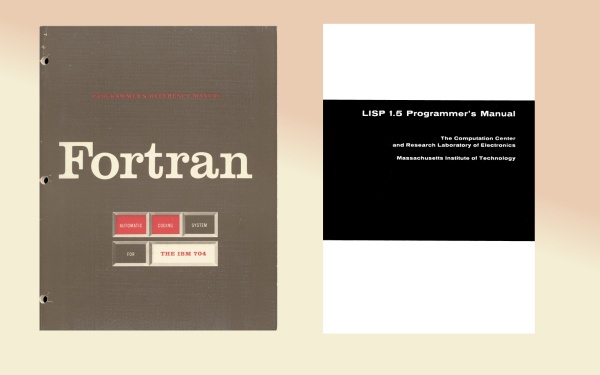
Lisp doesn’t have the mindshare it deserves. At fifty, it is the second-oldest programming language in the world, after Fortran. I’m starting to see the whole history of programming as a struggle between the elder brother, Fortran, and the younger sister, Lisp.

Fortran Vs Lisp

Programming is, at it’s core, an attempt to write down the solution to a problem so precisely that a mechanical device can perform the solution. We start with our own ideas, then use the program and a compiler to give us machine instructions;

ideas -> program -> machine instructions

There are two approaches; one is to find better ways to describe machine instructions, which is what FORTRAN does. The other is to find better ways to describe ideas, which is what Lisp does. These two languages established for us an axis; Almost every programming language thereafter fits somewhere in between these two giants.

So far, my impression is that lisp is an excellent language, let down by it’s awful libraries and tools; compared to Ruby, Python, Java, or C#, it just doesn’t have the libraries, and getting extant libraries installed is a dog. Worse, there is no canonical implementation, which means that your code may or may not work on someone else’s lisp; even worse news for libraries. It’s a pity, because the language itself seems beautiful and powerful. Meh.

Post to Twitter Tweet This Post

Object-oriented vs class-oriented programming

Sunday, January 13th, 2008

In his well-reasoned blog post, chuck hoffman argues that what are normally called object-oriented programming languages should probably more rightly be called class-oriented languages. The distinction hopefully becomes clear when you consider this example.

You are modelling people, and you want to create a person type. You should be able to strike up a conversation, so we want a ‘greet’ method for each. Our people (Alice, Bert, Charlie, and Dennis) all respond differently;

  • Alice responds to a greeting with “Hi!”, or a surly “what!?” if she hasn’t had her morning coffee.
  • Bert responds with either “don’t bother me, I’m walking Spot” or “what can I do for you?”, depending on whether he is walking his dog.
  • Charlie responds with either “good morning”, “good afternoon”, or “good evening”, depending on the time of day.
  • Dennis responds with “Hello, world!”

Now, in C#, that’s really tricky. Each person uses a different function to answer your greeting. But in C#, the Person class can only have one implementation. You could munge them all together;

class Person
{
  string Greet()
  {
    if (isBert && isWalkingSpot) {return "don't bother me, I'm walking Spot"; }
    else if (isAlice && !hasHadCoffee) { return "what!?"; }
    ... etc
  }
}

But that is monstrous. You could create subclasses;

class Dennis: Person
{
  public override string Greet() { return "Hello, World!"; } 
}

But this isn’t a class of thing; Dennis is singular. There’s not a whole class of Dennises, just a single solitary one.

What you really want to be able to do is something like this; (excuse the made-up syntax)

Person Alice = new Person();
Alice.HasCoffee = false;
Alice.Greet = { (HasCoffee ? "Hi!" : "what!?") }

Person Dennis = new Person();
Dennis.Greet = { "Hello, World" };

That’s what an object-oriented, rather than a class-oriented, version of c# might look like.

Post to Twitter Tweet This Post

C# Coding; Missing Functions on IEnumerable

Thursday, January 3rd, 2008

Me old mucker Spencer pointed out today that C# 3’s newly-refurbished IEnumerable<T> class lacks some basic features. Specifically, it lacks equivalents for the classic Map, Filter, and Reduce functions seen in functional languages. The first two are familiar as List<T>.ConvertAll, and List<T>.FindAll. The third isn’t so familiar, but is still very useful. I’ve also thrown in an implementation of ForEach for free.

Ben Hall points out that it’s possible to extend the class, but I wanted to get a full, commented implementation of the three functions. Feel free to use this code in your own work.

So, here they are;

IEnumerableExtras

public static class IEnumerableExtras
{
    /// <summary>
    /// Do 'action' to every item in the list.
    /// </summary>
    /// <typeparam name="T">The source type</typeparam>
    /// <param name="list">the IEnum</param>
    /// <param name="action">the action to perform.</param>
    public static void ForEach<T>
        (this IEnumerable<T> list, Action<T> action)
    {
        foreach (T item in list) { action(item); }
    }

    /// <summary>
    /// Convert every item in the list using the converter
    /// function
    /// </summary>
    /// <typeparam name="T">The source type</typeparam>
    /// <typeparam name="U">The destination type</typeparam>
    /// <param name="list">the list to convert</param>
    /// <param name="converter">a function to convert 
    /// one item to another.</param>
    /// <returns>all items in the list converted by 
    /// the converter function.</returns>
    public static IEnumerable<U> Map<T, U>
        (this IEnumerable<T> list, Converter<T, U> converter)
    {
        foreach (T item in list) 
        {
          yield return converter(item); 
        }
    }

    /// <summary>
    /// Returns a new enumerator containing only those 
    /// elements which return true from 'condition'.
    /// </summary>
    /// <typeparam name="T">The source type</typeparam>
    /// <param name="list">the list to filter</param>
    /// <param name="condition">the 'keep in' condition</param>
    /// <returns>the items for which condition(item) 
    /// is true</returns>
    public static IEnumerable<T> Filter<T>
        (this IEnumerable<T> list, Predicate<T> condition)
    {
        foreach (T item in list) 
        {
          if (condition(item))
          {
            yield return item; 
          }
        }
    }

    /// <summary>
    /// Reduces a list of items to a single item; can be 
    /// used to, say, sum a list of integers, or 
    /// concatenate a number of strings, or find the 
    /// maximum value in a collection.
    /// </summary>
    /// <typeparam name="T"></typeparam>
    /// <param name="list"></param>
    /// <param name="reducer"></param>
    /// <returns></returns>
    public static T Reduce<T>
        (this IEnumerable<T> list, Func<T, T, T> reducer)
    {
        IEnumerator<T> enumerator = list.GetEnumerator();
        if (enumerator.MoveNext())
        {
            // we have some items; start combining them together.
            T aggregator = enumerator.Current;
            while (enumerator.MoveNext())
            {
                aggregator = reducer(aggregator, 
                    enumerator.Current);
            }
            return aggregator;
        }
        else
        {
            // there was nothing in the list; return default.
            return default(T);
        }          
    }
}

And here’s an example program;

static void Main(string[] args)
{
  IEnumerable<double?> maybeDoubles = 
      new List<double?> {1, 2, null, 3, 4, null, null, null};

  // remove all the empty values: <double?>[1,2,3,4]
  IEnumerable<double?> noNulls = maybeDoubles.Filter(x => x.HasValue);

  // convert Nullable to non-nullable: ><double>[1,2,3,4]
  IEnumerable<double> notNullable = noNulls.Map(x => x.Value);

  // convert to strings so we can display them. <string>["1", "2", "3", "4"]
  IEnumerable<string> stringVersions = notNullable.Map(x=>x.ToString());

  // join the strings together with commas "1, 2, 3, 4"
  string displayString = stringVersions.Reduce( (s1, s2) => s1 + ", " + s2); 

  // show us the result; 
  Console.WriteLine(displayString);
  Console.ReadLine();
}

So there you go. Enjoy.

Post to Twitter Tweet This Post

The middle of a pantomine horse.

Monday, November 26th, 2007

In many ways, programming is like a pantomime horse.

Most programming tasks deal with one of two halves. There is the front end, which is the colourful world of web pages and clicky buttons and scrollbars and windows on your screen. The world of the pixel. Then there is the back end, the world of reading and writing data to disk. The world of the byte.

Both of these are necessary and noble worlds, and a programmer will tend to either live entirely in one world, or straddle both. If you change jobs, you can go to your next career saying, ‘I’ve played the back end of a horse for many years now.’ and they’ll be able to partner you up with a front end, and off you’ll trot and go do productive work together.

There is another path. A darker path. A path I have wandered down. The path of middleware.

In this world, you don’t play with pixels, and you don’t play with data. Not the way others do. What you become is a conduit, a transit system transforming one thing into another. Like intestines. It is dark, and smells. It’s necessary, but it ain’t nice.

I’ve been doing stuff like this for a while now, and I’m coming to the conclusion that it’s no fun being the middle of a horse.

So I’m trying to retrain myself in the skills at the ends of the horse; I shall be (re)learning the arts of the database. The back end. After that, I’ll be learning new ways to write websites; the front end.

Then I can be a whole horse again.

Post to Twitter Tweet This Post

How to choose functions in Visual Studio with the keyboard

Wednesday, September 12th, 2007

In Visual Studio, there’s pretty good support for keys, but for me it lacks one significant feature. That is the ability to jump to a function from inside a class. That is, if you’ve got a class open the text editor, you want to see a list of functions in the class, choose one, and navigate to it, via the keyboard. You’ll be familiar with it from the two drop-down lists at the top of the code window; however, this drop-down can’t be activated by keyboard.

Here’s a cheap and cheerful implementation of the same features. Put it into your macro module, and map the macro to a keyboard shortcut.

Sub ChooseFunctionAndNavigateInIde()
    Try
        Dim functionIndex As New Dictionary(Of String, Integer)

        Dim doc As Document = DTE.ActiveWindow.Document
        For Each elem As CodeElement In doc.ProjectItem.FileCodeModel.CodeElements
            BuildCodeElements(elem, functionIndex, 0)
        Next

        Dim result As Integer = FChooser.SelectItem(functionIndex)
        If (result = -1) Then
            ' user cancelled
            Return
        Else
            Dim sel As TextSelection = CType(doc.Selection, TextSelection)
            sel.GotoLine(result, True)
        End If
    Catch ex As Exception
    End Try
End Sub

Private Sub BuildCodeElements(ByVal elem As CodeElement, ByVal functionIndex As Dictionary(Of String, Integer), ByVal depth As Integer)

    Try
        Select Case elem.Kind
            Case vsCMElement.vsCMElementClass, vsCMElement.vsCMElementDelegate, vsCMElement.vsCMElementEnum, vsCMElement.vsCMElementEvent, vsCMElement.vsCMElementEventsDeclaration, vsCMElement.vsCMElementFunction, vsCMElement.vsCMElementInterface, vsCMElement.vsCMElementModule, vsCMElement.vsCMElementProperty
                Dim name As String = Space(depth * 4) & elem.Name
                Dim line As Integer = elem.GetStartPoint(vsCMPart.vsCMPartWholeWithAttributes).Line
                functionIndex.Add(name, line)
            Case Else

        End Select


    Catch ex As Exception

    End Try

    For Each child As CodeElement In elem.Children
        BuildCodeElements(child, functionIndex, depth + 1)
    Next
End Sub

Private Class FChooser
    Inherits Form

    Dim lv As ListView

    Public Shared Function SelectItem(ByVal list As Dictionary(Of String, Integer)) As Integer
        Dim chooser As New FChooser(List)
        chooser.BringToFront()
        chooser.ShowDialog()
        Return chooser.Result
    End Function


    Public Sub New(ByVal list As Dictionary(Of String, Integer))
        lv = New ListView()
        lv.Dock = DockStyle.Fill
        lv.View = View.List

        For Each kvp As KeyValuePair(Of String, Integer) In list
            Dim lvi As ListViewItem = lv.Items.Add(kvp.Key)
            lvi.Tag = kvp.Value
        Next
        Me.Controls.Add(lv)

        AddHandler lv.KeyUp, AddressOf Key
        AddHandler lv.DoubleClick, AddressOf DoubleClick


    End Sub

    Public Result As Integer = -1

    Public Sub DoubleClick(ByVal sender As Object, ByVal e As EventArgs)
        If (Me.lv.SelectedItems.Count = 1) Then
            Me.Result = CType(lv.SelectedItems(0).Tag, Integer)
            Me.Close()
        End If
    End Sub

    Public Sub Key(ByVal sender As Object, ByVal e As KeyEventArgs)
        If (e.KeyCode = Keys.Enter) Then
            Me.Result = CType(lv.SelectedItems(0).Tag, Integer)
            Me.Close()
        ElseIf (e.KeyCode = Keys.Escape) Then
            Result = -1
            Me.Close()
        Else
            ' could be a letter, and therefore a seek
            Dim letter As String = e.KeyCode.ToString().ToLower()
            If letter.Length = 1 And Regex.IsMatch(letter, "[a-z0-9]") Then
                ' find the first entry starting with this letter

                Dim found As ListViewItem = Nothing
                For Each lvi As ListViewItem In Me.lv.Items
                    Dim lviText As String = lvi.Text.Trim().ToLower()
                    If (found Is Nothing And lviText.StartsWith(letter)) Then
                        found = lvi
                    End If
                Next

                If (found Is Nothing = False) Then
                    For Each lvi As ListViewItem In Me.lv.Items
                        lvi.Selected = False
                    Next
                    found.Selected = True
                End If
            End If
        End If
    End Sub

End Class

Post to Twitter Tweet This Post