Category: Uncategorized
-
Recently, I had the pleasure of attending Linette’s exceptional bookbinding course. In just a single day, we were able to cover an impressive amount of skills, practical experience, and historical knowledge that felt like a week’s worth of content!
As a beginner to bookbinding and not exactly an experienced crafter, I was simply looking to bind some of my own writings. Linette’s a great teacher, and she made sure her instruction was tailored to the experience level of the group.
Throughout the course, we learned to create three distinct books, including two softcovers and one hardback. Everything we needed was provided, and Linette patiently guided us through the basics before diving into the hands-on activities. The first two books were a breeze to make, and I felt confident enough to create my own at home the very next day.
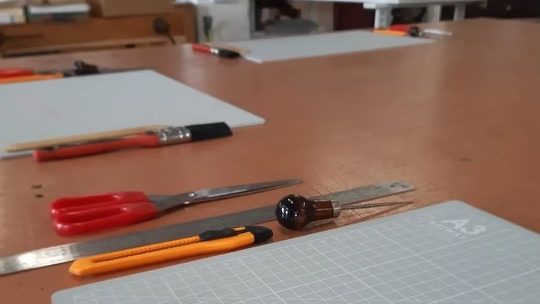
The hardback book required more effort, but Linette’s step-by-step guidance made the process enjoyable and rewarding. Linette keeps materials in a lot of designs and colours, and everyone was able to select something personal and walk away with a unique creation. We were all delighted with the results. I now feel equipped to tackle making hardbacks at home, albeit with a few additional materials.
What set this course apart was the rich historical background Linette provided on construction techniques. I feel like I’ve gained an understanding of bookbinding’s history, and that then has given me the ability to ‘read’ a book and discern its creation process. This newfound knowledge has made navigating tutorials, websites, and online shops much more easily — I can now confidently ‘talk book.’
I’d wholeheartedly recommend Linette’s bookbinding course to anyone interested in learning the craft. The experience was both practical and enlightening. I couldn’t have asked for a better introduction to the world of bookbinding.
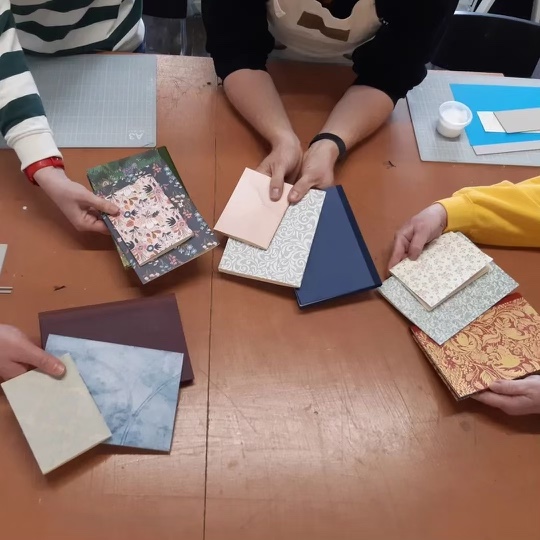
Go check out her site…
-
I’ve just started a new software development blog at SteveDrivenDevelopment.com. If you care about things like OO software, unit testing, and other similar subjects, why not come over and add me to your blog roll?
-
I asked a question in twitter about graph theory the other day. Unsurprisingly, it was tricky to convey what I wanted to know in such a short span. So this explains what i was wondering in more depth.
I’ve got a problem involving graph layouts (think dot and graphviz) I want to write a GUI program that lets the user draw directed graphs interactively. That is, they start with a single node. Then, to modify that graph, there are five basic operations:
– add a node above: that is, a node _A_ becomes the graph _B_ -> _A_
– add a graph below: _A_ -> _B_
– add an edge between two nodes
– delete an edge
– delete a node, and all connecting edgesAnd what I’d like to know is; to keep the UI responsive, can I precalculate the positions of every possible graph ahead of time? When the user makes a change, I can refer to the precalculated positions and keep the UI experience really fast.
This depends on how many possible nodes there are. If I am only ever going to see, say, 500,000 possible layouts, it is possible to just spend a couple of days chugging through all the possible configurations and saving them in a database.
Without any more limits, this is impossible — there are an infinite number of graphs. But I think I can make reasonable guesses about the types of graph I’m likely to see in my app. For instance;
– the graph is always connected
– no two nodes have a duplicate edge
– the graph has no cycles
– Nodes generally won’t have more than about five incoming nodes and five outgoing nodes
– A graph probably won’t have more than about 100 nodes in itSo here’s how I formulated the problem;
Given a directed acyclic graph with _N_ nodes, where no node has more than _E_ total incoming and outgoing nodes, how many possible graphs are there?
-
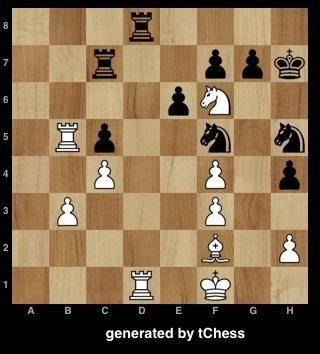
I’m struggling to see why a chess problem has the answer it does. Does anyone see why Nf6 is the right answer here? Looks crazy to me. Surely the knight can be taken without consequence by g7 or Nf5?
Pgn is:
[Event “”]
[Site “”]
[Date “2011.08.24”]
[Round “”]
[White “Player 1”]
[Black “Player 2”]
[Result “*”]
[ECO “”]
[SetUp “1”]
[FEN “3r4/2rN1ppk/4p3/1Rp2n1n/2P2P1p/1P3P2/5B1P/3R1K2 w – -“]1. Nf6+ * { isn’t the knight here simply undefended? }

-
Jord stood at the gates of Odin’s hall, and rapped the knuckles of her callused hands against the ancient black-oak door. “Odin! Odin! Open your gates, One-eye! I have come to kill your son!”
Through the gates, she could hear the sound of a feast. Deep inside the hall, a bard’s rich voice would sing a line, and a hundred hundred voices would roar a response. Nearer the door, she heard someone vomit.
“Do you hear me, old man? I have come for your son! I gave him life, and I shall take it back! Bring me Thor, that I might kill him!” She took up a stone from the ground, and brought it hard against the door. The sound reverberated into the hall. “Bring!” Bash. “Me!” Bash. “My!” Bash. “Son!”
The bard had stopped singing, and the sounds of laughter from inside had ceased. Jord could hear footsteps, then the doors of Valhalla, opened only for the souls of the battle-fallen, swung open. Inside, a great brown-haired Viking, fur-clad and looking for all the world like a bear, regarded her. Ten thousand pairs of eyes watched them both.
“Woman!” he bellowed. “This is Valhalla! The hall of Odin, Great and Grey-eyed Gallows-Lord!” Behind him, a chorus of drunken cheers.
“And here are the greatest bloodletters, beserkers, bonesplitters and throat-slitters who ever lived! Drinking bright mead and eagerly waiting for the Fenris-wolf and Ragnarok.” Behind him the great cheer swelled again.
“Inside also is Thor, Strong and Stalwart Sky-King! Far-famed Fighter in Battle!” To the jeers and cheers was added the thumping of tables and smacking of shields. The herald continued, heartened by the noise.
“Thor, the Friend of Fat-Feasting Ravens! Thor, the Spiller of Seas of Slaughter-dew! Thor, The Hard Hammer-Handed Warrior!” He took a long breath. “Who are _you_, that comes here, to this great host, and challenges the Lord of the Leaping Lightning and the Thunder-din?”
“I’m his mum.”
“… Ah.”
Jord pushed the man aside, and strode into the hall. Her eyes peered into and through the smoke, past the long trestles bursting with food, past the many thousands of men, battle-proved and strong, who sat at the tables. Each one regarded the small woman in silence. She ignored them and walked straight down the central aisle towards the top table.
Through the haze she could make out the great fire pit, over which was roasting the great cosmic boar Saehrimnir, cooked every night and returned to life every morning. She walked past it, looking on towards the great central table where the king of the gods sat with his favoured retinue.
As she passed the great cooking fire, and its brightness was at her back, she could see Odin, the god-king, sitting at the centre of his table. In one hand he held a great ham hock; in the other, a jewelled eating-knife. He was old, and scarred, and an eyepatch covered his vacant eye-socket. His hair was grey and white and black and wiry. On his right hand side sat Thor, the great blond god who could strike a man down with his mighty hammer, Mjolnir, or with lightning from the sky itself. The huge god sat there, with something like a smirk on his face. Behind that smile, though, Jord could see the slightest glimmer of fear. He knew he had done something, but he did not know what.
“Thor, my miserable son,” Jord said, “do you know what day of the week it is?”
He regarded her for a moment. “Mother, it is my day — Thorsday.”
“That’s right. And the day before?”
“Wodin’s day. In honour of my father.”
“Keep going. The days before that?”
“Tyr’s day, after Tyr One-Handed, who struggled with the great wolf Fenrir.” Jord sat watching him, waiting. “And Mani’s day before that, and then the day of Sunne, goddess of the Sun.”
“The first Sunday of spring…” she said, waiting for him to continue. Thor wrinkled his wide brows in thought. For long seconds he pondered.
“Mothering Sunday! By Freya’s freckly buttocks! I forgot!” His confusion changed to realisation, then near-panic. His voice dropped low, so that only those at the table could hear. “I’ll make it up to you,” he said. “I shall travel to the netherworld Svartalfaheim, and steal for you a great black pearl from the dwarves!”
“Not good enough.”
“I shall have my daughter, Thrud, weave you lace from threads of pure moonlight!”
“Not good enough.”
“I shall go to icy Niflheim, and wrestle from Hel her great cloak made from night and stars. ”
“Not good enough.”
“I shall… I…”
“There’s only one way you’re going to make up for it.”
Thor looked at her with a suspicious eye. “And… And how is that?”
She leaned forward, mouth next to Thor’s ear, and whispered “Give me a cuddle.”
Thor looked at her then, aghast, then at the horde of Odin, ten thousand warriors looking to their role model, waiting expectantly for the thunder-god’s response to the unknown request.
What else could he do? He gave his mum a hug.
-
A [recent post on Hacker News](http://news.ycombinator.com/item?id=1885594) made me wonder if **<inflammatory>Python is just VB.NET without ‘End If’. </inflammatory>**
I thought I’d try to translate Peter Norvig’s masterful spellchecker program in Python into VB.NET 2008. Could his beautiful little program be converted line-by-line into VB? The answer is *yes.*
Here’s the [original program](http://norvig.com/spell-correct.html);
import re, collections
def words(text): return re.findall(‘[a-z]+’, text.lower())
def train(features):
model = collections.defaultdict(lambda: 1)
for f in features:
model[f] += 1
return modelNWORDS = train(words(file(‘big.txt’).read()))
alphabet = ‘abcdefghijklmnopqrstuvwxyz’
def edits1(word):
splits = [(word[:i], word[i:]) for i in range(len(word) + 1)]
deletes = [a + b[1:] for a, b in splits if b]
transposes = [a + b[1] + b[0] + b[2:] for a, b in splits if len(b)>1]
replaces = [a + c + b[1:] for a, b in splits for c in alphabet if b]
inserts = [a + c + b for a, b in splits for c in alphabet]
return set(deletes + transposes + replaces + inserts)def known_edits2(word):
return set(e2 for e1 in edits1(word) for e2 in edits1(e1) if e2 in NWORDS)def known(words): return set(w for w in words if w in NWORDS)
def correct(word):
candidates = known([word]) or known(edits1(word)) or known_edits2(word) or [word]
return max(candidates, key=NWORDS.get)And here’s the equivalent VB;
Option Strict Off
Imports System.Text.RegularExpressions
Imports System.Collections.GenericModule NorvigSpellChecker
Dim NWORDS
Dim alphabet As String = “abcdefghijklmnopqrstuvwxyz”
Function words(ByVal text)
Return From match In Regex.Matches(text.ToLower(), “[a-z]+”) Select match.Value
End FunctionFunction train(ByVal features)
Dim model = New DefaultDict(Function() 1)
For Each f In features
model(f) += 1
Next
Return model
End FunctionFunction edits1(ByVal word) As IEnumerable(Of Object)
Dim splits = From i In Enumerable.Range(0, len(word)) Let a = word.Substring(0, i), b = word.Substring(i) Select a, b
Dim deletes = From split In splits Where ifs(split.b) Select split.a + split.b.Substring(1)
Dim transposes = From split In splits Where len(split.b) > 1 Select split.a + split.b.Substring(1, 1) + split.b.Substring(0, 1) + split.b.Substring(2)
Dim replaces = From split In splits From c In alphabet Where ifs(split.b) Select split.a + c + split.b.Substring(1)
Dim inserts = From split In splits From c In alphabet Select split.a + c + split.b
Return deletes.Union(transposes).Union(replaces).Union(inserts).Distinct()
End FunctionFunction known_edits2(ByVal word)
Return edits1(word).SelectMany(Function(e1) edits1(e1)).Distinct().Where(Function(e) NWORDS.ContainsKey(e))
End FunctionFunction known(ByVal words As IEnumerable)
Return From w In words Where NWORDS.ContainsKey(w) Select w
End FunctionFunction correct(ByVal word)
Dim candidates = ORR(Function() known(New String() {word}), Function() known(edits1(word)), Function() known_edits2(word), Function() New String() {word})
Return candidates.OrderBy(Function(candidate) NWORDS(candidate)).FirstOrDefault()
End FunctionEnd Module
Because I needed to define some python-equivalents, like the `len(string)` function, I ended up writing a bit more code, just to try to get a more exact match. Also, LINQ expressions need to know that certain things are enumerable, so I needed to litter a few type declarations through the code; about half a dozen. But overall I’m happy with the result. Take off the block terminators — ‘End Function’, ‘Next’, and ‘End Module’ — and you end up with a line-perfect equivalent.
Full source code [on github](https://github.com/stevecooperorg/Norvig-Spelling-Corrector-in-VB.NET/blob/master/NorvigSpellChecker.vb)
-
I have discovered a neat little hack for topping up you mobile on pay and go. Most companies use a fixed menu system. If your phone allows you to store phone numbers including hashes and pauses, you can create a contact that navigates the menu system like a robot rat. Here is the phone number you use on 02 to top up by £15;
44 44 ,#,1,#,1,#,#,9876#,543#,15#
You’ll need to swap ‘9876’ with the last digits of your debit card, and ‘543’ with the security code on the back.
If that’s a useful trick and you use another mobile provider or phone, feel free to post your own patterns in the comments.
-
I’m learning WPF, very slowly, as a background thing.
I’m working very slowly through some WPF at the moment, and discovered something I thought was really odd. The classic .Net Image class — System.Drawing.Image — can’t be easily databound into the WPF Image control.
That seemed crazy to me — it’s like having a `PictureBox` control without an `Image` property. I resolved to fix it in the most ‘WPFy’ way I could.
What I’d tried was binding a ListView to a list of objects, like so;
Id bound to an object which declares two properties;
string DisplayName { get; }
System.Drawing.Image Image { get; set; }I wanted to populate a `DataTemplate` but if I did this in my template;
The text appears but the image does not. It turns out that WPF can’t find a suitable converter.
So, thanks to [Reed Copsey](http://reedcopsey.com/) and his very helpful [pointer on Stack Overflow](http://social.msdn.microsoft.com/Forums/en-US/wpf/thread/833ca60f-6a11-4836-bb2b-ef779dfe3ff0/), and [this tutorial](http://www.switchonthecode.com/tutorials/wpf-tutorial-binding-converters), I’ve found a way I’m happy with; one that doesn’t involve c# code-behind.
I’ve created an `IValueConverter` which does the conversion from `System.Drawing.Image` to `System.Windows.Media.ImageSource`. A big thank-you to [Matt Galbraith of Microsoft](http://social.msdn.microsoft.com/profile/matt%20galbraith%20-%20msft) for providing the core code;
using System;
using System.Drawing.Imaging;
using System.Globalization;
using System.IO;
using System.Windows.Data;namespace System.Windows.Media
{
////// One-way converter from System.Drawing.Image to System.Windows.Media.ImageSource
///[ValueConversion(typeof(System.Drawing.Image), typeof(System.Windows.Media.ImageSource))]
public class ImageConverter : IValueConverter
{
public object Convert(object value, Type targetType,
object parameter, CultureInfo culture)
{
// empty images are empty…
if (value == null) { return null; }var image = (System.Drawing.Image)value;
// Winforms Image we want to get the WPF Image from…
var bitmap = new System.Windows.Media.Imaging.BitmapImage();
bitmap.BeginInit();
MemoryStream memoryStream = new MemoryStream();
// Save to a memory stream…
image.Save(memoryStream, image.RawFormat);
// Rewind the stream…
memoryStream.Seek(0, System.IO.SeekOrigin.Begin);
bitmap.StreamSource = memoryStream;
bitmap.EndInit();
return bitmap;
}public object ConvertBack(object value, Type targetType,
object parameter, CultureInfo culture)
{
return null;
}
}
}Then you need to bring the image converter into XAML as a resource. Add the namespace declaration to the window;
xmlns:med=”clr-namespace:System.Windows.Media”
Stick an instance of the `ImageConverter` into a static resource;
Then you can use it in XAML to bind directly to the Image, using the new converter;
So. A re-usable converter which allows databinding directly to GDI image objects.
Originally discussed [on stack overflow](http://stackoverflow.com/questions/3427034/using-xaml-to-bind-to-a-system-drawing-image-into-a-system-windows-image-control)
-
[http://2tbsp.com/node/100](http://2tbsp.com/node/100) suggests using google trends to judge popularity of ajax libraries; looking at the current data, it looks like jQuery is the clear winner so far in the AJAX library stakes. The current trends can be found [here](http://trends.google.com/websites?q=dojotoolkit.org%2C+jquery.com%2C+prototypejs.org%2C+mootools.net%2C+http%3A%2F%2Fdeveloper.yahoo.com%2Fyui%2F&geo=all&date=all&sort=2)


 Steve Cooper's Personal Blog